Confirm the product fit
- Detached single-family home in Texas
- Outside Dallas city limits
- Fixed-term, market-rate residential lease
- Tenant will use it as a primary residence

You receive a blank, interactive PDF and complete the transaction details yourself. RentSivo does not collect your lease facts or prepare a personalized agreement.
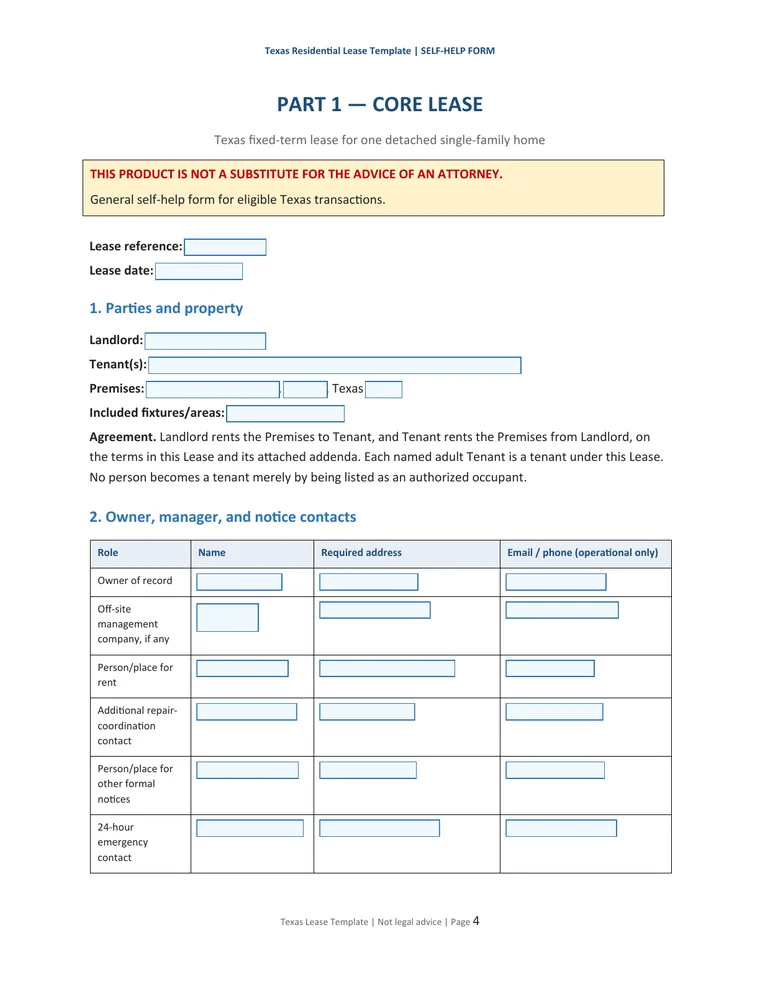
The product provides structured fields and instructions. It does not decide whether a fact, selection, or addendum is legally right for your transaction.
Confirm the rental matches every stated use condition and none of the exclusions.
When secure hosted checkout is live, pay USD 99 there. After verified payment, a secure download link will be sent to the email entered at checkout, normally within 15 minutes.
Enter the known facts, make each selection, and keep only conditional pages that apply.
Resolve blanks, use the parties’ chosen signing method, deliver the packet, and retain copies.
Collect the facts needed for your transaction and confirm that the product’s scope is appropriate before buying or completing the form.
Do not use the package for an apartment or multifamily property, subsidized or rent-restricted housing, program housing, a Dallas property, or a transaction needing custom legal terms.
Download the file to your device before entering information. Keep the untouched original so you can restart if needed.
Open the downloaded file in current Chrome or Adobe Acrobat Reader for reliable field, checkbox, and save behavior.
Enter facts carefully, make every required selection, and do not leave a visible blank merely because a value is repeated elsewhere.
The lease reference, date, property address, city, and ZIP repeat automatically where designed. Verify the repeated values before signing.
Keep the applicable pages, resolve the remaining blanks, save a final version, and give each signing party a completed copy.
Check names, dates, amounts, addresses, selections, attachments, and signature lines. Resolve inconsistencies before signing.
Use the signing method selected by the parties. RentSivo does not provide an electronic-signature service.
Provide the completed agreement and applicable attachments to every party using the transaction’s chosen delivery method.
Keep the original download, working file, signed packet, delivery records, and related transaction records in a secure location.
Need help opening, downloading, saving, or understanding the license? Contact technical support. Questions about what terms to choose require your own legal judgment or appropriate professional advice.
See the actual pages and confirm eligibility before payment.